十字军之王3家徽怎么改
本次为大家带来的是《十字军之王3》家徽修改方法的详细介绍。许多玩家可能对初始家族的家徽不太满意,想要进行修改。接下来,我们将详细介绍如何修改家徽,希望能为各位玩家提供帮助。
十字军之王3家徽修改方法
家徽代码
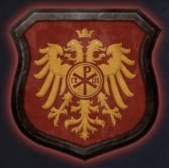
641 = { # Phokas
pattern = "pattern_solid.dds"
color1 = "red"
color2 = "yellow"
colored_emblem = {
texture = "ce_eagle_double.dds"
color1 = "yellow"
color2 = "yellow"
instance = { position = { 0.5 0.55 } scale = { 0.9 1.0 } }
}
colored_emblem = {
texture = "ce_crown_small.dds"
color1 = "yellow"
color2 = "red"
instance = { position = { 0.5 0.11 } scale = { 0.15 0.15 } }
}
colored_emblem = {
texture = "ce_circle.dds"
color1 = "red"
color2 = "red"
instance = { position = { 0.5 0.47 } scale = { 0.5 0.5 } }
}
colored_emblem = {
texture = "ce_circle.dds"
color1 = "yellow"
color2 = "yellow"
instance = { position = { 0.5 0.47 } scale = { 0.45 0.45 } }
}
colored_emblem = {
texture = "ce_circle.dds"
color1 = "red"
color2 = "red"
instance = { position = { 0.5 0.47 } scale = { 0.42 0.42 } }
}
colored_emblem = {
texture = "ce_circle.dds"
color1 = "yellow"
color2 = "yellow"
instance = { position = { 0.5 0.47 } scale = { 0.4 0.4 } }
}
colored_emblem = {
texture = "ce_chi_rho.dds"
color1 = "red"
color2 = "red"
instance = { position = { 0.5 0.47 } scale = { 0.3 0.3 } }
}
colored_emblem = {
texture = "ce_letter_alpha.dds"
color1 = "red"
color2 = "red"
instance = { position = { 0.42 0.47 } scale = { 0.09 0.09 } }
}
colored_emblem = {
texture = "ce_letter_omega.dds"
color1 = "red"
color2 = "red"
instance = { position = { 0.58 0.47 } scale = { 0.09 0.09 } }
}
}
使用方法
若想替换某个家族的家徽,首先需通过debug_mode查看该家族某个角色的ID,务必注意是“历史ID”。
接着,在historycharacters文件夹中找到该角色对应的文化txt文件,打开并搜索这个ID,例如搜索“302286 =”。
在这个历史ID下方的大括号中,“dynasty = XXX”里的数字即为想要替换的家族徽章ID。
打开commoncoat_of_armscoat_of_arms90_dynasties.txt文件,搜索家族徽章ID,即搜索“XXX =”。
如果能搜索到,说明这个家族拥有特殊家徽,只需将该家徽ID大括号内的内容删除,然后替换为前面641大括号内的内容即可。
如果搜索不到,则说明这个家族使用的是路人家徽,需要新建一个。
格式为:XXX = {内容}。
内容直接复制上面641大括号内的内容即可。
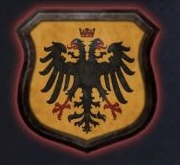
634 = { # Komnenos
pattern = "pattern_solid.dds"
color1 = "yellow"
color2 = "black"
colored_emblem = {
texture = "ce_eagle_double.dds"
color1 = "black"
color2 = "red"
instance = { position = { 0.5 0.55 } scale = { 0.9 1.0 } }
}
colored_emblem = {
texture = "ce_crown_head.dds"
color1 = "red"
color2 = "yellow"
instance = { position = { 0.5 0.11 } scale = { 0.15 0.15 } }
}
}
查找伯爵领ID的方法:在debug_mode下,鼠标放在地图上仅显示男爵领ID,右下角有个按钮可以显示公爵领ID,但伯爵领ID并未直接显示。
上一篇: 原神重云突破材料一览
下一篇: steam春季特卖时间2023
猜你喜欢
更多










- 热门攻略榜
- 最新攻略
-
1
 三国志战略版s3赛季怎么开荒
2026-05-22
-
2
风云岛行动吃鸭指南 新手吃鸭攻略大全
-
3
原神旅人的羽饰怎么样
-
4
暴走大侠七星剑阵怎么得
-
5
明日方舟火蓝之心复刻全关卡攻略汇总大全
-
6
星露谷物语手游攻略
-
7
龙族幻想性别体型转换功能详解
-
8
古代人生鬼市怎么去 鬼市攻略
-
9
光遇祈愿动作怎么获得
-
10
崩坏3通灵妖兽绯狱打法攻略
-
2
三国志战略版s3赛季怎么开荒
-
3
原神旅人的羽饰怎么样
-
4
风云岛行动吃鸭指南 新手吃鸭攻略大全
-
5
明日方舟火蓝之心复刻全关卡攻略汇总大全
-
6
星露谷物语手游攻略
-
7
光遇祈愿动作怎么获得
-
8
龙族幻想性别体型转换功能详解
-
9
崩坏3通灵妖兽绯狱打法攻略
-
10
古代人生鬼市怎么去 鬼市攻略



















- 角色 全民江湖手游渠道服 塔瑞斯世界安卓新版 绝区零公测游戏 未来人生futurelife 太空行动豆沙披萨 忍者时刻手机版
- 动作 零界战区特级咒术 逃跑吧少年神明服最新版2024 土豆兄弟二次元人物模组 土豆兄弟Brotato中文版 蜘蛛侠绳索英雄游戏 奥特曼传奇英雄黑暗迪迦存档版
- 射击 疾风大作战 向僵尸开炮2024 雷霆小分队 爆裂迷城游戏 魔法师大作战手机版 电锯果汁机
- 冒险 元气骑士6.2.0版本 曼尼汉堡店 60秒避难所生存中文版 时间猫 我在末日捡垃圾完整版 人狼村之谜安卓汉化版
- 体育 跨界网球3 排球少年TOUCHTHEDREAM 美职篮巅峰对决 美职篮绝对巨星 排球少年flyhigh港台服 足球大玩家未来之星
- 休闲 装扮梦想家园 人类游乐场汉化版自带模组 蛋仔派对1.0.141版本下载安装 欢乐钓鱼大师手机版本 希乐普与终极糖果手机版 史莱姆粘液进化

